

https://www.theodinproject.com/lessons/foundations-git-basics this is the lesson that i am following. I completed the Create the Repository section successfully. I also completed the Use the Git Workflow section successfully. It’s the Modify a File or two where I am facing all the difficulties.
Can someone please show me the way how to do it ?
The Odin Project provides support via their discord https://discord.gg/fbFCkYabZB
I had installed discord. Then uninstalled it again. Too much for me, absolutely !!!
I recommend just using discord in the browser instead of installing it, and muting most chats (or entire categories of chats) to quiet things down. The Odin project discord will likely be your best avenue for getting help.
Can you share what you have done so far and what you are unsure about? The section has a number of steps: https://www.theodinproject.com/lessons/foundations-git-basics#modify-a-file-or-two
For what it’s worth, I would guess that a lot of experienced people still look up guides or documentation on git when they need to do something that’s different from the basic clone/pull/commit/push. So don’t feel demotivated that you are having trouble wrapping your head around git.
I have done everything till we come to modify a file or two. I did everything in my WSL terminal. Then it’s being said over here we will open the directory (which directory) in visual studio code by using the command inside my repository (which repository and where is it located?) These are the questions l need to figure out.
WSL might make things a bit more complicated to understand at first, so that’s fair.
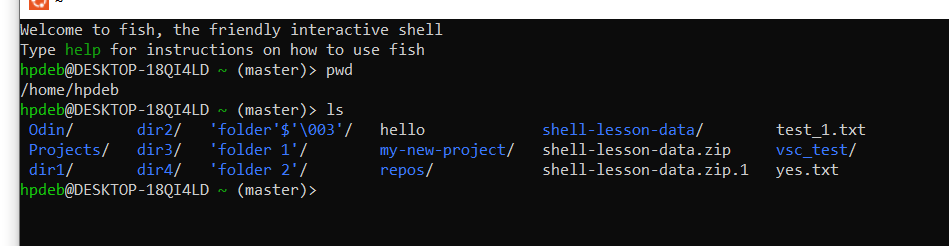
What do you see if you type
pwdinto the terminal where you are working? What aboutls? You can redact any personal info before pasting it in (ex. if your name is included in a file path).pwdwill output the current directory, which can help you track down the right folder to open in VSCodelswill output a list of all files in the current directory. If you see weird looking entries like.or.., don’t worry about those (I’m happy to explain, but for now it’s not important)
Usually when you are working on something, you would put all the files related to that project in a folder. That highest level folder is the one that you open in VScode, since you will be able to see all the subfolders easily. For example, my folders might look like this
|- My Documents
|   |-repos
|   |   |-My New Website
|   |   |
|   |   |-My app
|   |
In VSCode, you would open the “My New Website” folder when you are working on that project. In your case, you likely need to open whatever folder comes up from the output of
pwd, or one of the subfolders (if that one shows “/…/…/repos”. If your terminal supports it, you might also be able to open the current folder in vscode with a command likecode ., or in the file explorer withopen .If you have a messy setup, I would recommend learning some basic CLI commands for navigating your terminal first. That will help a lot for figuring out what is happening. Afterwards, you can easily navigate to the folder with all of your Odin Project files via. the terminal.
As for the repository, usually the repository is created from the root (the highest level) of whatever project you are working on. So if I cloned a repository called
otter/my-new-website, the repository is tied to the foldermy-new-website.This comes up as i type pwd and ls
I’ve heard good things about https://ohmygit.org/
i remember being completely lost at git and profs would just assume you know it. Nowadays i’d probably ask AI to walk me through it.
Oh yes, AI has been immensely helpful, no shame in owning up.


